Join the growing localization management platform! Build apps for all the teams already using Crowdin or Crowdin Enterprise to customize and extend localization experience.
3M+
Registered users
250k+
Projects
15k+
Active project owners
By creating Crowdin apps, developers can integrate existing services with Crowdin, add new features, upload and manage content.
To an end user, an app appears as a fully integrated part of Crowdin. Once your app is installed, its features are delivered straight to the Crowdin UI.
There are two ways to build a Crowdin app. Serverless apps run on Crowdin infrastructure: you write the UI, and Crowdin hosts and runs the app. Self-hosted apps run on a server you operate, which lets them use every module type, including those with server-side logic. Neither approach replaces the other. Pick the one that matches what your app does.
Serverless Apps
Build dashboards, panels, and other UI modules that run on Crowdin infrastructure. You scaffold, preview, and publish the app from the CLI, with no server to deploy or maintain.
Choose this path when your app is all interface: it displays data, extends the Crowdin UI, and calls the Crowdin API on behalf of the person using it.
Build an app backed by your own server, using any language and framework. This path supports every module type, including file processing, AI providers, and custom MT engines.
Choose this path when your app needs server-side logic: it processes files, reacts to webhooks, connects external services, or acts with the permissions of the account that installed it. Also choose it if you plan to publish the app on the Crowdin Store.
Self-hosted apps are web applications that function remotely via HTTP. You can develop them using any of the preferred programming languages and web frameworks, and deploy them in many different ways. From massive SaaS services to static apps served right from a code repo, self-hosted apps are designed to let you connect anything to Crowdin.
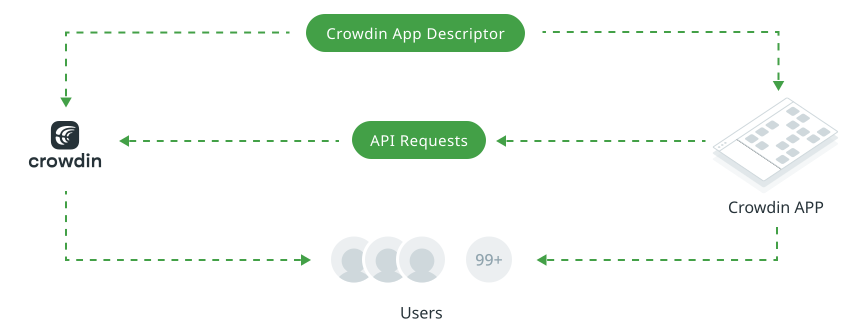
The development of Crowdin App starts with creating an app descriptor. The app descriptor is a JSON file that describes the interaction of the app with Crowdin. The descriptor includes general information for the app, as well as the modules that the app will be using or extending. Basically, the descriptor is a middle ground between the remote app and Crowdin. When a Crowdin account owner installs an app, what they are really doing is installing this descriptor file, which contains pointers to your app.
The next step would be to implement the app functionality according to the app descriptor which implies the following steps:
Step 1
Event listeners implementation – the usage of webhooks which are triggered by Crowdin to perform certain actions on the app side (installation of the app, app removal, etc).
Step 2
Modules implementation – module usage in the Crowdin apps. Modules are the functional parts integrated into the apps with help of which apps extend Crowdin and interact with it.
Crowdin Apps communicate with Crowdin using our RESTful APIs. You can use the Crowdin APIs in Crowdin apps you develop for Crowdin, as well as in scripts, API clients, or other methods of making calls.
Our APIs allow you to manage Crowdin TMs, glossaries, source content (files and strings), translations, branches, etc. You can use the APIs to upload source files, export translations, as well as for user management, generating reports, and more.
API OverviewExplore the Crowdin API documentation to learn more about the available endpoints and how to use them.
Need Help?
We support all developers who help us improve our product and add interesting developments to our community.
For improved interaction between the Crowdin app and Crowdin, you can use our library that provides cross-window communication. The library simplifies the interaction with the Crowdin interface, allows you to get additional information from the page where the application was opened, or manipulate certain UI elements of the page directly from the application.
After creating and testing your app, the next thing you need to do is to publish it into the cloud or any public server so that it’s always accessible to Crowdin and other users.
Before you start developing your own Crowdin apps, you can take a look at a few examples. They showcase the integration between Crowdin Enterprise and external services like Mailchimp and SendGrid. Read more about Crowdin Mailchimp Example and Crowdin SendGrid Example.
Our team is ready to help you with the technical implementation of your app. Once your app is ready we’ll discuss how we can help you with exposure to our customers. For any guidance from our team contact us at support@crowdin.com.